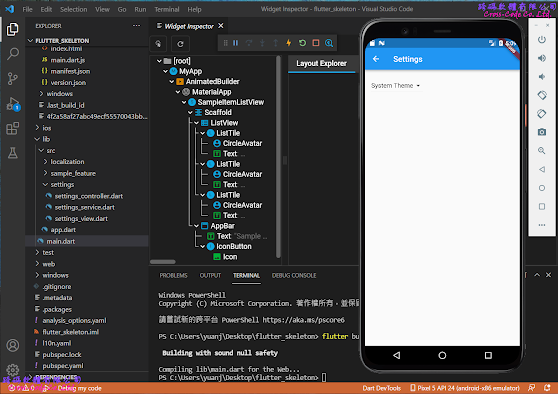
2022年1月17日 星期一

Flutter 插件 (Plugins) 專案範例

         Flutter  的插件 (Plugin) 專案範例提供建立插件(Plugin)的專案架構,而插件 ( Plugin )是一種特殊的Dart 包 (Package) 可以結合 Dart 碼和不同平台的程式語言。


1.  建立新的Flutter專案

  1-1.  開啟命令介面


  1-2.  選擇建立插件(Plugin) 專案類型

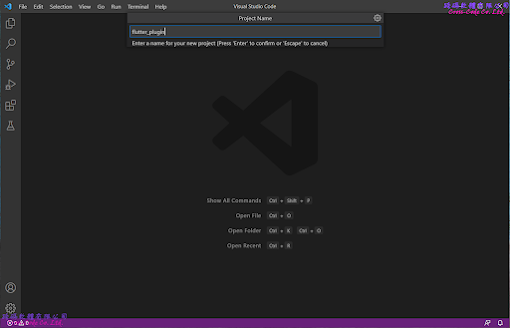
  1-3.  輸入專案名稱

2.  Flutter 預設插件專案的檔案架構

        在選擇建立新的插件專案後會自動產生相關的檔案及目錄,主要的檔案如下:

  2-1.  lib 目錄

        主要存放開發程式碼的目錄,而此範例中只提供一個簡單的範例程式檔案 。

  1.  flutter_plugin.dart  

    定義提供服務的插件(Plugin)類別,此類別主要是作為flutter 串接Dart 與執行各平台程式碼的包裝(Wrapper)程式。

import 'dart:async';
import 'package:flutter/services.dart';

class FlutterPlugin {
  static const MethodChannel _channel = MethodChannel('flutter_plugin');

  static Future<String?> get platformVersion async {
    final String? version = await _channel.invokeMethod('getPlatformVersion');
      return version;
  }
}

        2.  flutter_plugin_web.dart

     此檔案是根據pubspec.yaml和flutter_plugin.dart的內容在執行 "flutter create --template=plugin --platforms=web . " 指令產生出來且類別名稱會在原本的類別名稱上加入"Web"字串。


import 'dart:async';
import 'dart:html' as html show window;
import 'package:flutter/services.dart';
import 'package:flutter_web_plugins/flutter_web_plugins.dart';

class FlutterPluginWeb {
  static void registerWith(Registrar registrar) {
    final MethodChannel channel = MethodChannel(
      'flutter_plugin',
      const StandardMethodCodec(),
      registrar,
    );

    final pluginInstance = FlutterPluginWeb();
    channel.setMethodCallHandler(pluginInstance.handleMethodCall);
  }

  Future<dynamic> handleMethodCall(MethodCall call) async {
    switch (call.method) {
      case 'getPlatformVersion':
        return getPlatformVersion();
      default:
        throw PlatformException(
          code: 'Unimplemented',
          details: 'flutter_plugin for web doesn\'t implement \'${call.method}\'',
        );
      }
  }

  Future<String> getPlatformVersion() {
    final version = html.window.navigator.userAgent;
    return Future.value(version);
  }
}

        3.  linux 目錄

    此目錄是根據 pubspec.yaml 和 flutter_plugin.dart 的內容在執行 "flutter create --template=plugin --platforms=linux . " 指令後建立 GNU C++ 語言的類別函式來串接Dart 類別的程式。 


        4.  windows 目錄 

    此目錄是根據 pubspec.yaml 和 flutter_plugin.dart 的內容在執行 "flutter create --template=plugin --platforms=windows . " 指令後建立Visual C++ 語言的類別函式來串接 Dart 類別的程式。


        5.  android 目錄

    此目錄是根據 pubspec.yaml 和 flutter_plugin.dart 的內容在執行 "flutter create --template=plugin --platforms=android . " 指令後建立Kotlin 語言的類別函式來串接 Dart 類別的程式。


    2-2.  test 目錄

    主要存放使用Flutter提供的 test 測試函數對於類別庫(library)所提供的物件進行驗證程式。

  1.  flutter_plugin_test.dart

    測試 flutter_plugin 檔案中定義的FlutterPlugin類別是否能在不同平台上正確的執行與回傳預期資料型態。

import 'package:flutter/services.dart';
import 'package:flutter_test/flutter_test.dart';
import 'package:flutter_plugin/flutter_plugin.dart';

void main() {
  const MethodChannel channel = MethodChannel('flutter_plugin');

  TestWidgetsFlutterBinding.ensureInitialized();

  setUp(() {
    channel.setMockMethodCallHandler((MethodCall methodCall) async {
      return '42';
    });
  });

  tearDown(() {
    channel.setMockMethodCallHandler(null);
  });
  test('getPlatformVersion', () async {
    expect(await FlutterPlugin.platformVersion, '42');
  });
} 

    2-3.  pubspec.yaml檔案

    flutter 專案中的檔案配置檔,除了設定基本專案資訊並可設定專案中使用到的相依類別庫或外部資源。

name: flutter_plugin
description: A new flutter plugin project.
version: 0.0.1
homepage:

environment:
  sdk: ">=2.15.1 <3.0.0"
  flutter: ">=2.5.0"

dependencies:
  flutter:
    sdk: flutter
  flutter_web_plugins:
    sdk: flutter

dev_dependencies:
  flutter_test:
    sdk: flutter
  flutter_lints: ^1.0.0

flutter:
  plugin:
    platforms:
      windows:
        pluginClass: FlutterPlugin
      android:
        pluginClass: FlutterPlugin
        package: com.example.flutter_plugin
      web:
        pluginClass: FlutterPluginWeb
        fileName: flutter_plugin_web.dart
      linux:
        pluginClass: FlutterPlugin

    2-4.  .packages檔案

    flutter 專案中設定相依類別庫檔案路徑的組態檔,建立專案的預設檔案路徑為 flutter_plugin:lib/ 而此檔案是在執行"flutter pub get"指令後根據 pubspec.yaml中的內容產生出來,設定引用類別庫格式為【路徑別名:實際路徑】。

async:file:///D:/flutter_windows_2.8.1-stable/flutter/.pub-cache/hosted/pub.dartlang.org/async-2.8.2/lib/
boolean_selector:file:///D:/flutter_windows_2.8.1-stable/flutter/.pub-cache/hosted/pub.dartlang.org/boolean_selector-2.1.0/lib/
characters:file:///D:/flutter_windows_2.8.1-stable/flutter/.pub-cache/hosted/pub.dartlang.org/characters-1.2.0/lib/
charcode:file:///D:/flutter_windows_2.8.1-stable/flutter/.pub-cache/hosted/pub.dartlang.org/charcode-1.3.1/lib/
clock:file:///D:/flutter_windows_2.8.1-stable/flutter/.pub-cache/hosted/pub.dartlang.org/clock-1.1.0/lib/
collection:file:///D:/flutter_windows_2.8.1-stable/flutter/.pub-cache/hosted/pub.dartlang.org/collection-1.15.0/lib/
cupertino_icons:file:///D:/flutter_windows_2.8.1-stable/flutter/.pub-cache/hosted/pub.dartlang.org/cupertino_icons-1.0.4/lib/
fake_async:file:///D:/flutter_windows_2.8.1-stable/flutter/.pub-cache/hosted/pub.dartlang.org/fake_async-1.2.0/lib/
flutter:file:///D:/flutter_windows_2.8.1-stable/flutter/packages/flutter/lib/
flutter_lints:file:///D:/flutter_windows_2.8.1-stable/flutter/.pub-cache/hosted/pub.dartlang.org/flutter_lints-1.0.4/lib/
flutter_plugin:../lib/
flutter_test:file:///D:/flutter_windows_2.8.1-stable/flutter/packages/flutter_test/lib/
flutter_web_plugins:file:///D:/flutter_windows_2.8.1-stable/flutter/packages/flutter_web_plugins/lib/
js:file:///D:/flutter_windows_2.8.1-stable/flutter/.pub-cache/hosted/pub.dartlang.org/js-0.6.3/lib/
lints:file:///D:/flutter_windows_2.8.1-stable/flutter/.pub-cache/hosted/pub.dartlang.org/lints-1.0.1/lib/
matcher:file:///D:/flutter_windows_2.8.1-stable/flutter/.pub-cache/hosted/pub.dartlang.org/matcher-0.12.11/lib/
meta:file:///D:/flutter_windows_2.8.1-stable/flutter/.pub-cache/hosted/pub.dartlang.org/meta-1.7.0/lib/
path:file:///D:/flutter_windows_2.8.1-stable/flutter/.pub-cache/hosted/pub.dartlang.org/path-1.8.0/lib/
sky_engine:file:///D:/flutter_windows_2.8.1-stable/flutter/bin/cache/pkg/sky_engine/lib/
source_span:file:///D:/flutter_windows_2.8.1-stable/flutter/.pub-cache/hosted/pub.dartlang.org/source_span-1.8.1/lib/
stack_trace:file:///D:/flutter_windows_2.8.1-stable/flutter/.pub-cache/hosted/pub.dartlang.org/stack_trace-1.10.0/lib/
stream_channel:file:///D:/flutter_windows_2.8.1-stable/flutter/.pub-cache/hosted/pub.dartlang.org/stream_channel-2.1.0/lib/
string_scanner:file:///D:/flutter_windows_2.8.1-stable/flutter/.pub-cache/hosted/pub.dartlang.org/string_scanner-1.1.0/lib/
term_glyph:file:///D:/flutter_windows_2.8.1-stable/flutter/.pub-cache/hosted/pub.dartlang.org/term_glyph-1.2.0/lib/
test_api:file:///D:/flutter_windows_2.8.1-stable/flutter/.pub-cache/hosted/pub.dartlang.org/test_api-0.4.3/lib/
typed_data:file:///D:/flutter_windows_2.8.1-stable/flutter/.pub-cache/hosted/pub.dartlang.org/typed_data-1.3.0/lib/
vector_math:file:///D:/flutter_windows_2.8.1-stable/flutter/.pub-cache/hosted/pub.dartlang.org/vector_math-2.1.1/lib/
flutter_plugin_example:lib/


3.  Flutter  插件載入範例專案的檔案架構

  在選擇建立新的插件專案後會自動產生載入插件的範例應用程式檔案及目錄,主要的檔案如下:

    3-1.  example\lib 目錄

    主要存放開發程式碼的目錄,main.dart 中的 main 函式為啟動程式的入口函式,而此範例程式是說明如何載入自訂插件(Plugin)及執行自訂類別與函式的方法。

        1.  main.dart

  使用非同步的方式執行 flutter_plugin 檔案中定義 FlutterPlugin 類別的取得執行平台版本函式結果顯示於營幕上。

import 'package:flutter/material.dart';
import 'dart:async';
import 'packge:flutter/services.dart';
import 'package:flutter_plugin/flutter_plugin.dart';

void main() {
  runApp(const MyApp());
}

class MyApp extends StatefulWidget {
  const MyApp({Key? key}) : super(key: key);

  @override
  State<MyApp> createState() => _MyAppState();
}

class _MyAppState extends State<MyApp> {
  String _platformVersion = 'Unknown';

  @override
  void initState() {
    super.initState();
    initPlatformState();
  }

  Future<void> initPlatformState() async {
    String platformVersion;
    try {
      platformVersion =
        await FlutterPlugin.platformVersion ?? 'Unknown platform version';
    } on PlatformException {
      platformVersion = 'Failed to get platform version.';
    }
     
    if (!mounted) return;
      
    setState(() {
      _platformVersion = platformVersion;
    });
  }

  @override
  Widget build(BuildContext context) {
    return MaterialApp(
      home: Scaffold(
        appBar: AppBar(
          title: const Text('Plugin example app'),
        ),
        body: Center(
          child: Text('Running on: $_platformVersion\n'),
        ),
      ),
  );}
}

        2.  generated_plugin_registrant.dart

  此檔案是根據 pubspec.yaml 和 flutter_plugin.dart 的內容在執行 "flutter create --template=plugin --platforms=web . " 指令產生出來且類別名稱是根據插件 (Plugin) 的 pubspec.yaml中依據指定平台所定義的類別名稱,而且名稱必須是符合原先定義類別名稱 + "Web"字串的格式。

import 'package:flutter_plugin/flutter_plugin_web.dart';
import 'package:flutter_web_plugins/flutter_web_plugins.dart';

void registerPlugins(Registrar registrar) {
  FlutterPluginWeb.registerWith(registrar);
  registrar.registerMessageHandler();
}

    3-2.  example\test 目錄

    主要存放使用Flutter提供的 test 測試函數對於類別庫(library)所提供的物件進行驗證程式。

        1.  widget_test.dart

  使用testWidgets函式測試 flutter_plugin 檔案中定義的FlutterPlugin類別在載入後在不同的平台上執行是否會影響應用程式的執行,因此此程式只是確認在建立此應用程式後是否在介面上有產生 textWidget物件和此物件顯示的字串包含 "Running on:"。

import 'package:flutter/material.dart';
import 'package:flutter_test/flutter_test.dart';
import 'package:flutter_plugin_example/main.dart';

void main() {
  testWidgets('Verify Platform version', (WidgetTester tester) async {
  
    await tester.pumpWidget(const MyApp());

    expect(
      find.byWidgetPredicate(
        (Widget widget) => widget is Text &&
          widget.data!.startsWith('Running on:'),
      ),
      findsOneWidget,
    );
  });
}

    3-3.  example\pubspec.yaml檔案

    flutter 專案中的檔案配置檔,除了設定基本專案資訊並可設定專案中使用到的相依類別庫或外部資源;而使用插件( Plugin) 時需要設定載入插件 (Plguin) 的檔案名稱與路徑在使用插件 (Plugin) 專案的pubspec.yaml。

name: flutter_plugin_example
description: Demonstrates how to use the flutter_plugin plugin.

publish_to: 'none'

environment:
  sdk: ">=2.15.1 <3.0.0"

dependencies:
  flutter:
    sdk: flutter

  flutter_plugin:   
    path: ../
 
  cupertino_icons: ^1.0.2

dev_dependencies:
  flutter_test:
    sdk: flutter
  flutter_lints: ^1.0.0

flutter:
  uses-material-design: true

    3-4.  example\.packages檔案

    flutter 專案中設定相依類別庫檔案路徑的組態檔,建立專案的預設檔案路徑為 flutter_plugin_example:lib/ 而此檔案是在執行"flutter pub get"指令後根據 pubspec.yaml中的內容產生出來,設定引用類別庫格式為【路徑別名:實際路徑】。

async:file:///D:/flutter_windows_2.8.1-stable/flutter/.pub-cache/hosted/pub.dartlang.org/async-2.8.2/lib/
boolean_selector:file:///D:/flutter_windows_2.8.1-stable/flutter/.pub-cache/hosted/pub.dartlang.org/boolean_selector-2.1.0/lib/
characters:file:///D:/flutter_windows_2.8.1-stable/flutter/.pub-cache/hosted/pub.dartlang.org/characters-1.2.0/lib/
charcode:file:///D:/flutter_windows_2.8.1-stable/flutter/.pub-cache/hosted/pub.dartlang.org/charcode-1.3.1/lib/
clock:file:///D:/flutter_windows_2.8.1-stable/flutter/.pub-cache/hosted/pub.dartlang.org/clock-1.1.0/lib/
collection:file:///D:/flutter_windows_2.8.1-stable/flutter/.pub-cache/hosted/pub.dartlang.org/collection-1.15.0/lib/
cupertino_icons:file:///D:/flutter_windows_2.8.1-stable/flutter/.pub-cache/hosted/pub.dartlang.org/cupertino_icons-1.0.4/lib/
fake_async:file:///D:/flutter_windows_2.8.1-stable/flutter/.pub-cache/hosted/pub.dartlang.org/fake_async-1.2.0/lib/
flutter:file:///D:/flutter_windows_2.8.1-stable/flutter/packages/flutter/lib/
flutter_lints:file:///D:/flutter_windows_2.8.1-stable/flutter/.pub-cache/hosted/pub.dartlang.org/flutter_lints-1.0.4/lib/
flutter_plugin:../lib/
flutter_test:file:///D:/flutter_windows_2.8.1-stable/flutter/packages/flutter_test/lib/
flutter_web_plugins:file:///D:/flutter_windows_2.8.1-stable/flutter/packages/flutter_web_plugins/lib/
js:file:///D:/flutter_windows_2.8.1-stable/flutter/.pub-cache/hosted/pub.dartlang.org/js-0.6.3/lib/
lints:file:///D:/flutter_windows_2.8.1-stable/flutter/.pub-cache/hosted/pub.dartlang.org/lints-1.0.1/lib/
matcher:file:///D:/flutter_windows_2.8.1-stable/flutter/.pub-cache/hosted/pub.dartlang.org/matcher-0.12.11/lib/
meta:file:///D:/flutter_windows_2.8.1-stable/flutter/.pub-cache/hosted/pub.dartlang.org/meta-1.7.0/lib/
path:file:///D:/flutter_windows_2.8.1-stable/flutter/.pub-cache/hosted/pub.dartlang.org/path-1.8.0/lib/
sky_engine:file:///D:/flutter_windows_2.8.1-stable/flutter/bin/cache/pkg/sky_engine/lib/
source_span:file:///D:/flutter_windows_2.8.1-stable/flutter/.pub-cache/hosted/pub.dartlang.org/source_span-1.8.1/lib/
stack_trace:file:///D:/flutter_windows_2.8.1-stable/flutter/.pub-cache/hosted/pub.dartlang.org/stack_trace-1.10.0/lib/
stream_channel:file:///D:/flutter_windows_2.8.1-stable/flutter/.pub-cache/hosted/pub.dartlang.org/stream_channel-2.1.0/lib/
string_scanner:file:///D:/flutter_windows_2.8.1-stable/flutter/.pub-cache/hosted/pub.dartlang.org/string_scanner-1.1.0/lib/
term_glyph:file:///D:/flutter_windows_2.8.1-stable/flutter/.pub-cache/hosted/pub.dartlang.org/term_glyph-1.2.0/lib/
test_api:file:///D:/flutter_windows_2.8.1-stable/flutter/.pub-cache/hosted/pub.dartlang.org/test_api-0.4.3/lib/
typed_data:file:///D:/flutter_windows_2.8.1-stable/flutter/.pub-cache/hosted/pub.dartlang.org/typed_data-1.3.0/lib/
vector_math:file:///D:/flutter_windows_2.8.1-stable/flutter/.pub-cache/hosted/pub.dartlang.org/vector_math-2.1.1/lib/
flutter_plugin_example:lib/


4.  執行各平台Flutter 偵錯自訂包(Package)

  點選右下角No Devices項目後切換至要執行偵錯的平台並執行 Run -> Start Debugging (F5) 進行偵錯

 4-1.  Windows Desktop
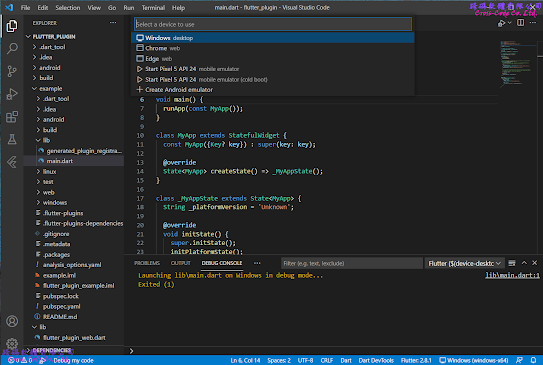

    4-2.  Chrome Web


 4-3.  Linux APP (Ubuntu)


 4-4.  Android APP


2022年1月12日 星期三

Flutter 包 (Package) 專案範例

Flutter 的包( Package )專案範例,提供建立以純Dart語言包(Package)的專案架構。


1.  建立新的Flutter專案

    1-1.  開啟命令介面


    1-2.  選擇建立包(Package) 專案類型


    1-3.  輸入專案名稱


2.  Flutter 預設包專案的檔案架構

    在選擇建立新的包專案後會自動產生相關的檔案及目錄,主要的檔案如下:    

    2-1.  lib 目錄

        主要存放開發程式碼的目錄,而此範例中只提供一個簡單的範例程式檔案 ,flutter_ package.dart 中定義 Caculator 類別提供給外部引用程式使用;而檔案中使用library關鍵字(Keywords)用來宣告此檔案為類別庫(library)的主檔案且此宣告必須在程式開頭。

library flutter_package;

/// A Calculator.
class Calculator {
  /// Returns [value] plus 1.
  int addOne(int value) => value + 1;
}

    2-2.  test 目錄

        主要存放使用Flutter提供的 test 測試函數對於類別庫(library)所提供的物件進行驗證程式。

1.  flutter_package_test.dart  

        測試由 flutter_package 檔案中所引用的Calculator 類別是否執行正確性 ,藉由輸入不同的值並設定預期回傳的值來判斷是否回傳正確,若不是則會在執行時產生例外。

import 'packag:flutter_test/flutter_test.dart';
import 'package:flutter_package/flutter_package.dart';

void main() {
  test('adds one to input values', () {
    final calculator = Calculator();
      expect(calculator.addOne(2), 3);
      expect(calculator.addOne(-7), -6);
      expect(calculator.addOne(0), 1);
  });
}


    2-3.  pubspec.yaml檔案

        flutter 專案中的檔案配置檔,除了設定基本專案資訊並可設定專案中使用到的相依類別庫或外部資源。

name: flutter_package
description: A new Flutter package project.
version: 0.0.1
homepage:

environment:
  sdk: ">=2.15.1 <3.0.0"
  flutter: ">=1.17.0"

dependencies:
  flutter:
    sdk: flutter

dev_dependencies:
  flutter_test:
    sdk: flutter
  flutter_lints: ^1.0.0

flutter:

    2-4.  .packages檔案

         flutter 專案中設定相依類別庫檔案路徑的組態檔,建立專案的預設檔案路徑為 flutter_package:lib/ 而此檔案是在執行"flutter pub get"指令後根據 pubspec.yaml中的內容產生出來,設定引用類別庫格式為【路徑別名:實際路徑】。


async:file:///D:/flutter_windows_2.8.1-stable/flutter/.pub-cache/hosted/pub.dartlang.org/async-2.8.2/lib/
boolean_selector:file:///D:/flutter_windows_2.8.1-stable/flutter/.pub-cache/hosted/pub.dartlang.org/boolean_selector-2.1.0/lib/
characters:file:///D:/flutter_windows_2.8.1-stable/flutter/.pub-cache/hosted/pub.dartlang.org/characters-1.2.0/lib/
charcode:file:///D:/flutter_windows_2.8.1-stable/flutter/.pub-cache/hosted/pub.dartlang.org/charcode-1.3.1/lib/
clock:file:///D:/flutter_windows_2.8.1-stable/flutter/.pub-cache/hosted/pub.dartlang.org/clock-1.1.0/lib/
collection:file:///D:/flutter_windows_2.8.1-stable/flutter/.pub-cache/hosted/pub.dartlang.org/collection-1.15.0/lib/
fake_async:file:///D:/flutter_windows_2.8.1-stable/flutter/.pub-cache/hosted/pub.dartlang.org/fake_async-1.2.0/lib/
flutter:file:///D:/flutter_windows_2.8.1-stable/flutter/packages/flutter/lib/
flutter_lints:file:///D:/flutter_windows_2.8.1-stable/flutter/.pub-cache/hosted/pub.dartlang.org/flutter_lints-1.0.4/lib/
flutter_test:file:///D:/flutter_windows_2.8.1-stable/flutter/packages/flutter_test/lib/
lints:file:///D:/flutter_windows_2.8.1-stable/flutter/.pub-cache/hosted/pub.dartlang.org/lints-1.0.1/lib/
matcher:file:///D:/flutter_windows_2.8.1-stable/flutter/.pub-cache/hosted/pub.dartlang.org/matcher-0.12.11/lib/
meta:file:///D:/flutter_windows_2.8.1-stable/flutter/.pub-cache/hosted/pub.dartlang.org/meta-1.7.0/lib/
path:file:///D:/flutter_windows_2.8.1-stable/flutter/.pub-cache/hosted/pub.dartlang.org/path-1.8.0/lib/
sky_engine:file:///D:/flutter_windows_2.8.1-stable/flutter/bin/cache/pkg/sky_engine/lib/
source_span:file:///D:/flutter_windows_2.8.1-stable/flutter/.pub-cache/hosted/pub.dartlang.org/source_span-1.8.1/lib/
stack_trace:file:///D:/flutter_windows_2.8.1-stable/flutter/.pub-cache/hosted/pub.dartlang.org/stack_trace-1.10.0/lib/
stream_channel:file:///D:/flutter_windows_2.8.1-stable/flutter/.pub-cache/hosted/pub.dartlang.org/stream_channel-2.1.0/lib/
string_scanner:file:///D:/flutter_windows_2.8.1-stable/flutter/.pub-cache/hosted/pub.dartlang.org/string_scanner-1.1.0/lib/
term_glyph:file:///D:/flutter_windows_2.8.1-stable/flutter/.pub-cache/hosted/pub.dartlang.org/term_glyph-1.2.0/lib/
test_api:file:///D:/flutter_windows_2.8.1-stable/flutter/.pub-cache/hosted/pub.dartlang.org/test_api-0.4.3/lib/
typed_data:file:///D:/flutter_windows_2.8.1-stable/flutter/.pub-cache/hosted/pub.dartlang.org/typed_data-1.3.0/lib/
vector_math:file:///D:/flutter_windows_2.8.1-stable/flutter/.pub-cache/hosted/pub.dartlang.org/vector_math-2.1.1/lib/
flutter_package:lib/

3.  執行各平台Flutter 偵錯自訂包(Package)

建立新的應用程式專案用來載入並使用自訂包(Package)的定義類別。

     3-1.  新增自訂包(Package)路徑  

        在pubspec.yaml檔案中新增載入自訂包的路徑後執行“flutter pub get”命令進行更新.packages檔案。

name: flutter_application
description: A new Flutter project.

publish_to: 'none' 

version: 1.0.0+1

environment:
  sdk: ">=2.15.1 <3.0.0"

dependencies:
  flutter:
    sdk: flutter
   
  flutter_package:
    path: C:/Users/yuanj/Desktop/flutter_package

  cupertino_icons: ^1.0.2

dev_dependencies:
  flutter_test:
    sdk: flutter

  flutter_lints: ^1.0.0

flutter:

  uses-material-design: true

     執行更新命令後則相關路徑會新增至 .packages檔案

async:file:///D:/flutter_windows_2.8.1-stable/flutter/.pub-cache/hosted/pub.dartlang.org/async-2.8.2/lib/
boolean_selector:file:///D:/flutter_windows_2.8.1-stable/flutter/.pub-cache/hosted/pub.dartlang.org/boolean_selector-2.1.0/lib/
characters:file:///D:/flutter_windows_2.8.1-stable/flutter/.pub-cache/hosted/pub.dartlang.org/characters-1.2.0/lib/
charcode:file:///D:/flutter_windows_2.8.1-stable/flutter/.pub-cache/hosted/pub.dartlang.org/charcode-1.3.1/lib/
clock:file:///D:/flutter_windows_2.8.1-stable/flutter/.pub-cache/hosted/pub.dartlang.org/clock-1.1.0/lib/
collection:file:///D:/flutter_windows_2.8.1-stable/flutter/.pub-cache/hosted/pub.dartlang.org/collection-1.15.0/lib/
cupertino_icons:file:///D:/flutter_windows_2.8.1-stable/flutter/.pub-cache/hosted/pub.dartlang.org/cupertino_icons-1.0.4/lib/
fake_async:file:///D:/flutter_windows_2.8.1-stable/flutter/.pub-cache/hosted/pub.dartlang.org/fake_async-1.2.0/lib/
flutter:file:///D:/flutter_windows_2.8.1-stable/flutter/packages/flutter/lib/
flutter_lints:file:///D:/flutter_windows_2.8.1-stable/flutter/.pub-cache/hosted/pub.dartlang.org/flutter_lints-1.0.4/lib/
flutter_package:file:///C:/Users/yuanj/Desktop/flutter_package/lib/
flutter_test:file:///D:/flutter_windows_2.8.1-stable/flutter/packages/flutter_test/lib/
lints:file:///D:/flutter_windows_2.8.1-stable/flutter/.pub-cache/hosted/pub.dartlang.org/lints-1.0.1/lib/
matcher:file:///D:/flutter_windows_2.8.1-stable/flutter/.pub-cache/hosted/pub.dartlang.org/matcher-0.12.11/lib/
meta:file:///D:/flutter_windows_2.8.1-stable/flutter/.pub-cache/hosted/pub.dartlang.org/meta-1.7.0/lib/
path:file:///D:/flutter_windows_2.8.1-stable/flutter/.pub-cache/hosted/pub.dartlang.org/path-1.8.0/lib/
sky_engine:file:///D:/flutter_windows_2.8.1-stable/flutter/bin/cache/pkg/sky_engine/lib/
source_span:file:///D:/flutter_windows_2.8.1-stable/flutter/.pub-cache/hosted/pub.dartlang.org/source_span-1.8.1/lib/
stack_trace:file:///D:/flutter_windows_2.8.1-stable/flutter/.pub-cache/hosted/pub.dartlang.org/stack_trace-1.10.0/lib/
stream_channel:file:///D:/flutter_windows_2.8.1-stable/flutter/.pub-cache/hosted/pub.dartlang.org/stream_channel-2.1.0/lib/
string_scanner:file:///D:/flutter_windows_2.8.1-stable/flutter/.pub-cache/hosted/pub.dartlang.org/string_scanner-1.1.0/lib/
term_glyph:file:///D:/flutter_windows_2.8.1-stable/flutter/.pub-cache/hosted/pub.dartlang.org/term_glyph-1.2.0/lib/
test_api:file:///D:/flutter_windows_2.8.1-stable/flutter/.pub-cache/hosted/pub.dartlang.org/test_api-0.4.3/lib/
typed_data:file:///D:/flutter_windows_2.8.1-stable/flutter/.pub-cache/hosted/pub.dartlang.org/typed_data-1.3.0/lib/
vector_math:file:///D:/flutter_windows_2.8.1-stable/flutter/.pub-cache/hosted/pub.dartlang.org/vector_math-2.1.1/lib/
flutter_application:lib/

    3-2.  載入自訂包(Package)

在main.dart檔案中新增載入自訂包的路徑和執行自訂函式

import 'package:flutter/material.dart';
import 'package:flutter_package/flutter_package.dart';

void main() {
  runApp(const MyApp());
}

class MyApp extends StatelessWidget {
  const MyApp({Key? key}) : super(key: key);

  @override
  Widget build(BuildContext context) {
    return MaterialApp(
      title: 'Flutter Demo',
      theme: ThemeData(
        primarySwatch: Colors.blue,
      ),
      home: const MyHomePage(title: 'Flutter Demo Home Page'),
   );
  }
}

class MyHomePage extends StatefulWidget {
  const MyHomePage({Key? key, required this.title}) : super(key: key);

  final String title;

  @override
  State<MyHomePage> createState() => _MyHomePageState();
}

class _MyHomePageState extends State<MyHomePage> {
  int _counter = 0;

  void _incrementCounter() {
    setState(() {
      _counter++;
    });
  }

  @override
  Widget build(BuildContext context) {
  
  final  calculator = Calculator();
  final _counter2 =  calculator.addOne(_counter);

  return Scaffold(
    appBar: AppBar(
      title: Text(widget.title),
    ),
    body: Center(
      child: Column(
        mainAxisAlignment: MainAxisAlignment.center,
        children: <Widget>[           
          const Text(
            'You have pushed the button this many times:', 
          ),
          Text(
            '$_counter',
            style: Theme.of(context).textTheme.headline4,
          ),
          Text(
            "The addOne Value of Calculator Class : $_counter2",
          ),
        ],
      ),
    ),
    floatingActionButton: FloatingActionButton(
      onPressed: _incrementCounter,
      tooltip: 'Increment',
      child: const Icon(Icons.add),
    ), 
  );
}}

    3-3.  各平台中執行自訂包(Package)相關函式


Windows Desktop


Chrome Web


Linux APP (Ubuntu) 


Android APP


2022年1月8日 星期六

Flutter 骨架 (Skeleton) 專案範例

Flutter  提供骨架(Skeleton)專案範例,主要提供下列功能說明:

  1.  專案中新增/設定本地化( Localizations)檔案
  2.  程式中動態切換主題(Theme)的方法
  3.  導航與路由 (Navigate & Routing)的方法


1.        建立新的Flutter專案

1-1.        開啟命令介面


1-2.        選擇建立骨架 (Skeleton) 專案類型

1-3.        輸入專案名稱 


2.        Flutter 預設骨架專案的檔案架構

在選擇建立新的骨架專案後會自動產生相關的檔案及目錄,主要的檔案如下:

2-1.  build目錄 

    儲存各平台建置完成後產生的執行檔案

     (1)  app/outputs/apk -  

       選擇建置andoird平台後所產生的apk檔


(2)  windows/runner/ -

       選擇建置 windows平台後所產生的exe及dll檔案。


(3)  web

       選擇建置web平台後所產生相關的html及js檔案。


(4)  linux/x64/release/bundle

                     選擇建置linux平台後所產生的執行檔及.so檔案。


2-2.  lib目錄

        主要存放開發程式碼的目錄,main.dart 中的 main 函式為啟動程式的入口函式,而此範例程式使用非同步的方法載入主題(Thmem)的資料,因此在main 函式後加入 async 關鍵字。

若要直接引用存放於此目錄下的檔案的格式如下:

  •      引用同層目錄的檔案:import "檔案名稱";
  •   引用子目錄的檔案: import "子目錄名稱/檔案名稱";
  •   引用上層目錄的檔案: import "../目錄名稱/檔案名稱";

import 'package:flutter/material.dart';
import 'src/app.dart';
import 'src/settings/settings_controller.dart';
import 'src/settings/settings_service.dart';

void main() async {
  final settingsController = SettingsController(SettingsService());

  await settingsController.loadSettings();

  runApp(MyApp(settingsController: settingsController));
}

2-3.  test目錄

         主要存放使用Flutter中WidgetTester的測試程序對指定Widget物件進行互動驗證程式與 test 測試函數進行自訂函數的驗證而 group 函數為可組合多次連續測試程序,此範例專案提供兩個測試範例:

1.  unit_test.dart  

        測試自訂的1+1是否等於二的函數正確性,若正確則會回傳test函數中定義的字串,若不是則會在執行時產生例外。

import 'package:flutter_test/flutter_test.dart';

void main() {
  group('Plus Operator', () {
    test('should add two numbers together', () {
      expect(1 + 1, 2);
    });
  });
}


2.  widget_test.dart
測試自訂MaterialApp在建立時是否會包含多於一個Text物件,若正確則會回傳execpt函數中定義的字串,若不是則會在執行時產生例外。
import 'package:flutter/material.dart';
import 'package:flutter_test/flutter_test.dart';

void main() {
  group('MyWidget', (){
     estWidgets('should display a string of text', (WidgetTester tester) async {  
    // Define a Widget
    const myWidget = MaterialApp(
      home: Scaffold(
        body: Text('Hello'),
      ),
    );
    // Build myWidget and trigger a frame.
    await tester.pumpWidget(myWidget);

    // Verify myWidget shows some text
    expect(find.byType(Text), findsOneWidget);
   });
 });
} 


2-4.  pubspec.yaml檔案

         flutter 專案中的檔案配置檔,除了設定基本專案資訊並可設定專案中使用到的相依類別庫或外部資源。

name: flutter_skeleton
description: A new Flutter project.

# Prevent accidental publishing to pub.dev.
publish_to: 'none'

version: 1.0.0+1

environment:
  sdk: ">=2.15.1 <3.0.0"

dependencies:
  flutter:
    sdk: flutter
  flutter_localizations:
    sdk: flutter
    version: ^0.0.0

dev_dependencies:
  flutter_test:
    sdk: flutter

  flutter_lints: ^1.0.0

flutter:
  uses-material-design: true

  # Enable generation of localized Strings from arb files.
  generate: true

  assets:
  # Add assets from the images directory to the application.
  - assets/images/

2-5.  .packages檔案

flutter 專案中設定相依類別庫檔案路徑的組態檔,建立專案的預設檔案路徑為 flutter_skeleton:lib/ 而此檔案是在執行"flutter pub get"指令後根據 pubspec.yaml中的內容產生出來,設定引用類別庫格式為【路徑別名:實際路徑】。

async:file:///D:/flutter_windows_2.8.1-stable/flutter/.pub-cache/hosted/pub.dartlang.org/async-2.8.2/lib/
boolean_selector:file:///D:/flutter_windows_2.8.1-stable/flutter/.pub-cache/hosted/pub.dartlang.org/boolean_selector-2.1.0/lib/
characters:file:///D:/flutter_windows_2.8.1-stable/flutter/.pub-cache/hosted/pub.dartlang.org/characters-1.2.0/lib/
charcode:file:///D:/flutter_windows_2.8.1-stable/flutter/.pub-cache/hosted/pub.dartlang.org/charcode-1.3.1/lib/
clock:file:///D:/flutter_windows_2.8.1-stable/flutter/.pub-cache/hosted/pub.dartlang.org/clock-1.1.0/lib/
collection:file:///D:/flutter_windows_2.8.1-stable/flutter/.pub-cache/hosted/pub.dartlang.org/collection-1.15.0/lib/
fake_async:file:///D:/flutter_windows_2.8.1-stable/flutter/.pub-cache/hosted/pub.dartlang.org/fake_async-1.2.0/lib/
flutter:file:///D:/flutter_windows_2.8.1-stable/flutter/packages/flutter/lib/
flutter_lints:file:///D:/flutter_windows_2.8.1-stable/flutter/.pub-cache/hosted/pub.dartlang.org/flutter_lints-1.0.4/lib/
flutter_localizations:file:///D:/flutter_windows_2.8.1-stable/flutter/packages/flutter_localizations/lib/
flutter_test:file:///D:/flutter_windows_2.8.1-stable/flutter/packages/flutter_test/lib/
intl:file:///D:/flutter_windows_2.8.1-stable/flutter/.pub-cache/hosted/pub.dartlang.org/intl-0.17.0/lib/
lints:file:///D:/flutter_windows_2.8.1-stable/flutter/.pub-cache/hosted/pub.dartlang.org/lints-1.0.1/lib/
matcher:file:///D:/flutter_windows_2.8.1-stable/flutter/.pub-cache/hosted/pub.dartlang.org/matcher-0.12.11/lib/
meta:file:///D:/flutter_windows_2.8.1-stable/flutter/.pub-cache/hosted/pub.dartlang.org/meta-1.7.0/lib/
path:file:///D:/flutter_windows_2.8.1-stable/flutter/.pub-cache/hosted/pub.dartlang.org/path-1.8.0/lib/
sky_engine:file:///D:/flutter_windows_2.8.1-stable/flutter/bin/cache/pkg/sky_engine/lib/
source_span:file:///D:/flutter_windows_2.8.1-stable/flutter/.pub-cache/hosted/pub.dartlang.org/source_span-1.8.1/lib/
stack_trace:file:///D:/flutter_windows_2.8.1-stable/flutter/.pub-cache/hosted/pub.dartlang.org/stack_trace-1.10.0/lib/
stream_channel:file:///D:/flutter_windows_2.8.1-stable/flutter/.pub-cache/hosted/pub.dartlang.org/stream_channel-2.1.0/lib/
string_scanner:file:///D:/flutter_windows_2.8.1-stable/flutter/.pub-cache/hosted/pub.dartlang.org/string_scanner-1.1.0/lib/
term_glyph:file:///D:/flutter_windows_2.8.1-stable/flutter/.pub-cache/hosted/pub.dartlang.org/term_glyph-1.2.0/lib/
test_api:file:///D:/flutter_windows_2.8.1-stable/flutter/.pub-cache/hosted/pub.dartlang.org/test_api-0.4.3/lib/
typed_data:file:///D:/flutter_windows_2.8.1-stable/flutter/.pub-cache/hosted/pub.dartlang.org/typed_data-1.3.0/lib/
vector_math:file:///D:/flutter_windows_2.8.1-stable/flutter/.pub-cache/hosted/pub.dartlang.org/vector_math-2.1.1/lib/
flutter_skeleton:lib/

2-6.  I10n.yaml

flutter 專案中的本地化(localization)配置檔,主要用來設定放置不同本地化(Localization)檔案路徑、預設本地化檔案及產生出載入本地化檔案的程式檔名稱。

arb-dir: lib/src/localization
template-arb-file: app_en.arb
output-localization-file: app_localizations.dart

此範例專案只有建立基本的本地化(localication)  arb 檔案 

{
	"appTitle": "flutter_skeleton",
	"@appTitle": {
		"description": "The title of the application"
	}
}

         若專案中有出現無法載入本地化(localization)檔案,則可在Terminal 視窗中執行 「flutter pub add "gen_l10n/app_localizations.dart"」於.dart_tool目錄下產生相應的目錄及檔案。


3.  Flutter 預設骨架專案的基本架構 

        一個最基本的 MaterialApp  的骨架 (Skeleton) 程式,至個 MaterialApp 與 AnimatedBuilder 兩個類別並搭配以混入 (mixins) ChangeNotifier 類別的方式自訂 SettingsController  類別作為主題 (Theme) 切換時產生通知事件的參數。

        因此在建立 Skeleton 專案時會自動產生其基本的運用方法,後續可以依照需求針對 AnimatedBuilder 及 MaterialApp 兩個類別所提供的參數進行程式外觀及操作介面的調整。

import 'package:flutter/material.dart';
import 'package:flutter_gen/gen_l10n/app_localizations.dart';
import 'package:flutter_localizations/flutter_localizations.dart';

import 'sample_feature/sample_item_details_view.dart';
import 'sample_feature/sample_item_list_view.dart';
import 'settings/settings_controller.dart';
import 'settings/settings_view.dart';

/// The Widget that configures your application.
class MyApp extends StatelessWidget {
  const MyApp({ Key? key, required this.settingsController,})
               : super(key: key);

  final SettingsController settingsController;

  @override
  Widget build(BuildContext context) {
    return AnimatedBuilder(
      animation: settingsController,
      builder: (BuildContext context, Widget? child) {
        return MaterialApp(
         restorationScopeId: 'app',
         localizationsDelegates: const [
           AppLocalizations.delegate,
           GlobalMaterialLocalizations.delegate,
           GlobalWidgetsLocalizations.delegate,
           GlobalCupertinoLocalizations.delegate,
         ],
         supportedLocales: const [
           Locale('en', ''), // English, no country code
         ],          
         onGenerateTitle: (BuildContext context) => 
                  AppLocalizations.of(context)!.appTitle,
         
         theme: ThemeData(),
         darkTheme: ThemeData.dark(),
         themeMode: settingsController.themeMode,
 
         onGenerateRoute: (RouteSettings routeSettings) {
           return MaterialPageRoute<void>(
             settings: routeSettings,
             builder: (BuildContext context) {
               switch (routeSettings.name) {
                 case SettingsView.routeName:
                   return SettingsView(controller: settingsController);
                 case SampleItemDetailsView.routeName:
                   return const SampleItemDetailsView();
                 case SampleItemListView.routeName:
                 default:
                   return const SampleItemListView();
             }},
         );}
      );},
   );}
}


4.        執行各平台Flutter 偵錯

        點選右下角No Devices項目後切換至要執行偵錯的平台並執行 Run -> Start Debugging (F5) 進行偵錯

4-1.        Windows Desktop


4-2.        Chrome Web


4-3.        Linux APP (Ubuntu)


4-4.        Android APP

在執行Android APP時,若無實體裝置需要先開啟Android Studio並使用AVD Manage建立模擬Android裝置


 執行時選擇所要執行的Android裝置